top of page
Search
linkbuildingservic5
Sep 10
8 min read
FAQ Schema Generator

You have a page with useful questions and answers, but Google still seems to treat the FAQ section like ordinary text.


That is where structured data comes in.


With the right FAQ Page JSON-LD markup, you can give search engines a clearer description of the questions and answers already present on your page. You do not need to be a developer to create it either. An FAQ Schema Generator can turn your normal FAQ text into the JSON-LD code you can add to your website.


There is one important catch in 2026, though. Google has retired its FAQ rich result feature. So adding FAQ Page schema today is not about getting those old expandable FAQ listings under your search result. The value is more about keeping your page content clearly structured and machine-readable, while following Google's current structured data guidance.


What is FAQ Page JSON-LD schema?
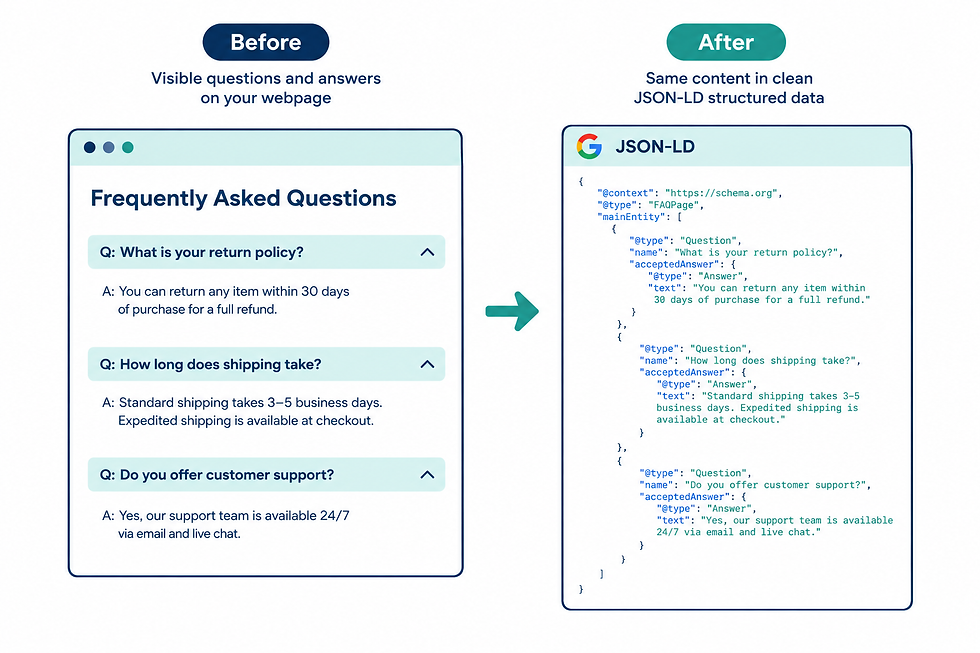

What is FAQPage JSON-LD schema?

FAQ Page schema is structured data that describes a page containing frequently asked questions and their answers.


JSON-LD is simply a way of putting this information into a format that search engines can read. You normally add it inside a <script> tag in your page's HTML rather than displaying the code to visitors.


A basic example looks like this:


<script type="application/ld+json">
{
  "@context": "https://schema.org",
  "@type": "FAQPage",
  "mainEntity": [
    {
      "@type": "Question",
      "name": "What is FAQ schema?",
      "acceptedAnswer": {
        "@type": "Answer",
        "text": "FAQ schema is structured data that describes questions and answers on a webpage."
      }
    }
  ]
}
</script>

The important parts are easy to understand.


FAQ Page tells search engines what type of page information they are looking at.

Question identifies an individual question.


accepted Answer identifies the answer belonging to that question.


The answer text should match what users can actually see on the page. Google's guidance for structured data stresses that markup should describe visible page content rather than hidden or unrelated information.


Google's own structured data documentation for FAQ pages is worth bookmarking, since it's the definitive source for what's required and what's changed.


Does FAQ schema still matter after Google's FAQ rich result change?


This is where many older SEO articles are now misleading.


Google deprecated the FAQ rich result feature in 2026. That means you should not add FAQ Page schema expecting the old FAQ dropdowns to appear below your organic search result.


So why bother with it?


Structured data can still help describe and classify information on a webpage. More importantly, the process of creating good FAQ markup forces you to keep your questions and answers clear, complete, and consistent with the actual page.


There is also a bigger point about AI search.


Google's current documentation says AI Overviews and AI Mode do not require special schema or another separate markup format. Pages need to meet the normal technical requirements for Google Search, be indexable, and follow Google's existing SEO and content guidance.


So FAQ Page schema should not be treated as an "AI Overview trick." There is no guarantee that adding it will make your content appear in an AI answer.


Instead, think of it as one part of a clean technical setup. Well-written answers, useful page content, crawlability, internal links, strong site structure, and other SEO fundamentals still matter. Structured data works alongside those basics, not instead of them.


The underlying format comes from Schema.org's FAQPage specification, which is the shared vocabulary search engines and AI tools use to understand this kind of content.


How does an FAQ Schema Generator work?


Writing JSON-LD by hand is possible, but it is easy to make small mistakes.


One missing bracket can break the markup. A misplaced quotation mark can make the JSON invalid. It is also easy to accidentally leave an old question in the code after changing the visible FAQ section.


An FAQ Schema Generator solves much of this manual work.


You enter your questions and answers into the tool. The generator then maps that information to the correct Schema.org structure and produces JSON-LD code.

In simple terms, it converts this:


Question: What is FAQ schema?


Answer: FAQ schema is structured data that describes questions and answers on a webpage.

Into something like this:

{
  "@type": "Question",
  "name": "What is FAQ schema?",
  "acceptedAnswer": {
    "@type": "Answer",
    "text": "FAQ schema is structured data that describes questions and answers on a webpage."
  }
}

For several questions, the generator creates multiple Question objects inside the main Entity array.


That is the main job of the tool. It saves you from manually building the JSON structure.


How to generate FAQ Page JSON-LD without writing code


You can create FAQ schema in a few simple steps.


Step 1: Write the actual questions first


Start with the questions people genuinely ask about the page topic.


For example, if you have an article about meta descriptions, useful questions could include:


  • What is a meta description?

  • How long should a meta description be?

  • Does a meta description affect rankings?


Do not create questions simply to add more schema. A small FAQ section with useful answers is better than a long list of weak questions.


Step 2: Write complete answers


Each answer should actually answer its question.


Avoid vague responses such as "Yes, it is important" when the reader needs an explanation.

For example:

A meta description is a short summary of a webpage that can appear below the page title in search results. It helps searchers understand what the page is about before clicking.

That is much more useful than simply saying:


Yes, meta descriptions are important.

Step 3: Enter the content into an FAQ Schema Generator


Open your chosen generator and add each question and answer.


A good generator should take your plain text and produce properly structured FAQ Page JSON-LD. You should not need to understand every line of the generated code.


Still, always review the output before publishing it.


Step 4: Copy the generated JSON-LD


The tool will normally give you a block of code beginning with something similar to:


<script type="application/ld+json">

Copy the complete block.


Do not copy only part of the JSON. The opening and closing structure needs to remain intact.


Step 5: Add it to the webpage


The exact process depends on your website platform.


If you use WordPress, your SEO or schema plugin may already provide a place to add structured data. Some websites allow you to add the JSON-LD directly to the page template or HTML.


If you are unsure where to put it, ask your developer or check the documentation for your CMS.


Step 6: Test the markup


Do not assume the code is correct just because it was generated by a tool.


Google recommends validating structured data and checking how Google sees the page. You can use Google's testing tools and Search Console to identify problems.


After publishing, remember that changes are not reflected instantly. Google needs to crawl and process the page.


What should good FAQ schema look like?


A clean setup usually follows a simple relationship:


Visible question → matching schema question


Visible answer → matching schema answer


For example:

Correct setup

Common mistake

FAQ is visible on the page

FAQ exists only inside the schema

Schema matches visible wording

Schema contains different answers

Answers provide useful information

Answers are mainly advertisements

Each question is relevant

Questions are added only for keywords

JSON-LD is valid

Broken brackets or invalid JSON

Content is kept up to date

Old answers remain in the markup

The key idea is consistency.


If your webpage says one thing while your structured data says something else, you are creating two versions of the same information. That can make the markup less useful and may lead search engines to ignore it.


Common FAQ schema mistakes to avoid


Common FAQ schema mistakes

Marking up content that users cannot see


This is one of the easiest mistakes to make.


Someone might create ten FAQ entries in JSON-LD but show only five questions on the page. That creates a mismatch.


Your markup should represent the content users can access.


Adding promotional answers


An FAQ answer should answer the question.


For example, if the question is "What is link building?" an answer that spends most of its space promoting a service is not a good FAQ answer.


Give the reader the information first.


Creating duplicate questions


You do not need three slightly different questions that all have the same answer.

For example:


"How does FAQ schema work?"


"What is FAQ schema used for?"


"What does FAQ schema do?"


If all three answers are basically identical, combining them into one strong question may make more sense.


Forgetting to update the schema


This happens more often than people think.


You update the visible FAQ answer but forget that the old answer is still sitting inside the JSON-LD.


Always check both versions after making major content changes.


Expecting a rich result


This is the biggest outdated expectation.


Google has retired the FAQ rich result feature, so passing a structured data test does not mean Google will display the old FAQ search feature. Google also states more generally that valid structured data does not guarantee that a search feature will appear.


Validation tells you whether the markup is technically valid. It does not promise a particular search appearance.


Can FAQ schema help with Google AI Overview?


There is a lot of confusion around this topic.


FAQ Page schema is not a special ticket into Google AI Overviews. Google explicitly says there is no special schema or markup required to appear in AI Overviews or AI Mode.


Google's AI search systems rely on information from its search index and use existing search and quality systems to find relevant pages. Pages still need to be crawlable, indexable, useful, and eligible to appear in normal Search.


That means the smarter approach is to create genuinely useful FAQ content that answers specific questions clearly.


If an AI system finds your page relevant to a user's question, clear answers can make the information easier to understand. But there is no reliable way to say, "Add FAQ schema and Google will cite you in AI Overview."


Anyone promising that is overselling what schema can do.


How do you check if your FAQ schema is working?


Start with validation.


Check that the JSON-LD has no syntax problems and that the question and answer structure is correct.


Then check the actual webpage. Make sure the FAQ content is visible, readable, and accessible to users. Before publishing, it's worth running the page through Google's Rich Results Test to catch any errors before they show up in Search Console.


After the page is live, use Google Search Console to monitor how Google processes your site. Google recommends using URL Inspection when checking how Google sees a page, and it may take time for crawling and indexing to reflect changes.


Also remember that a valid schema result does not automatically mean Google will show a special search feature.


That distinction saves a lot of unnecessary SEO troubleshooting.


FAQ Schema Generator: Frequently Asked Questions


Is FAQ Page schema still supported by Google?


FAQ Page is a Schema.org type, but Google deprecated its FAQ rich result feature in 2026. You should not expect the former FAQ rich result appearance in Google Search.


Do I need coding knowledge to create FAQ schema?


No. You can use an FAQ Schema Generator to enter normal questions and answers and generate the JSON-LD automatically. You should still review the output and make sure it matches the content on your page.


Does FAQ schema guarantee a Google rich result?


No. Google does not guarantee that structured data will produce a particular search appearance. In the case of FAQ rich results, Google has retired that feature altogether.


Does FAQ schema guarantee AI Overview visibility?


No. Google says there is no special schema required for AI Overviews or AI Mode. Your page still needs strong, helpful content and must meet Google's normal technical and Search requirements.


The simple way to approach FAQ Page schema


FAQ schema is easier to understand when you stop thinking of it as a ranking shortcut.

Your first job is to create useful questions and answers for real readers. Your second job is to make sure the structured data accurately describes that content.


An FAQ Schema Generator simply makes the second part easier by turning your plain questions and answers into machine-readable JSON-LD.


The old FAQ rich result may be gone, but clean structured data can still be part of a well-organized technical SEO setup. Just do not confuse valid markup with a guarantee of visibility.

If you want to generate the code without building the JSON by hand, you can try a free FAQ schema generator and then validate the result before adding it to your page.


The best takeaway is simple: write the FAQ for people, make the schema match it exactly, test the markup, and never treat schema as a shortcut around good SEO.


linkbuildingservic5
Aug 29
2 min read
Backlink Health Checklist

Use this quick self-check to get a snapshot of your backlink profile's health. It's not a substitute for a full audit, but it will flag the most common warning signs in about 10 minutes — no tools required beyond Google Search Console, which is free.


How to Use This Checklist


Go through each item below with your Search Console "Links" report open. Check off each box that's true for your site. At the end, use the scoring guide to see where you stand.


Section 1: Link Sources


  •  I know roughly how many referring domains link to my site

  •  Most of my referring domains are topically related to my niche (even loosely)

  •  I don't recognize a large number of unfamiliar, low-quality-looking domains in my links report

  •  I haven't purchased links without disclosure (sponsored or nofollow tags)

  •  I'm not part of any link exchange or reciprocal linking network


Section 2: Anchor Text


  •  My anchor text is varied — a mix of branded terms, naked URLs, and generic phrases

  •  Exact-match commercial keywords make up a small minority of my anchors, not the majority

  •  No single anchor phrase repeats across a large percentage of my backlinks


Section 3: Link Growth Pattern


  •  My referring domain count has grown gradually over time, not in sudden spikes

  •  I haven't run a large "link building push" that added dozens of links in a short window

  •  My link growth roughly tracks with my content publishing pace


Section 4: Risk & Compliance


  •  I've checked Google Search Console's Manual Actions report and see no link-related issues

  •  I'm not aware of any of my links coming from PBNs, link farms, or auto-generated content networks

  •  I haven't received any warnings or notices about my backlink profile


Your Score

Backlink Scorecard

12-14 checked: Your link profile is in good shape. Focus on maintaining a steady, relevant link acquisition pace going forward.

8-11 checked: You likely have some risk factors worth investigating further. A closer audit would help you identify exactly which links need attention.

Below 8 checked: There's a meaningful chance your profile has patterns that could limit rankings or create risk. We'd recommend a full audit before building any new links.


What This Checklist Doesn't Cover


This is a fast self-assessment, not a full audit. It won't catch everything — subtle placement context issues, deeper anchor text distribution analysis, and cross-referencing multiple data sources all require a more thorough process. For the full methodology, see how we approach a complete backlink audit.


Want a full, professional audit of your backlink profile instead of a self-check? Get started with our link building service — we'll walk through your entire profile and tell you exactly where you stand.


Updated: Sep 16

What Is Guest Posting

Getting backlinks is still part of many SEO strategies, but the way you build those links matters. Two methods that often come up are guest posting and niche edits. Both can work, but they are not the same, and the better choice depends on your website, goals, and the quality of the link opportunity.


If you are looking for guest post opportunities, this guide will help you understand how guest posts compare with niche edits, where each method works best, and what to check before building a link in 2026.


What Is Guest Posting?


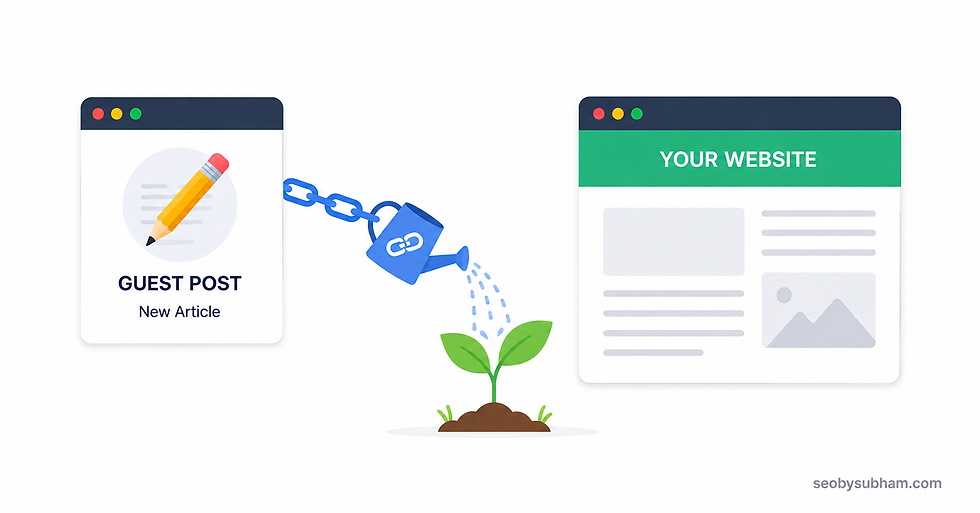
Guest posting means creating an original article for another website and including a relevant link to your own website within the content.


For example, imagine you run a website about digital marketing. You find a marketing blog that accepts contributions. You write an article about content promotion, and naturally mention one of your own useful resources in the article. The website publishes the post, and you receive a backlink.


The main advantage is that you are not only getting a link. You are also creating a new piece of content that can bring referral traffic and introduce your brand to another audience.


Good guest posting is based on relevance. A link from a website that regularly publishes content about your industry is usually more useful than a random link from a site that accepts articles about everything.


What Are Niche Edits?


A niche edit, sometimes called a contextual link placement, is a backlink added to an existing article or webpage.


Instead of writing a completely new article, you find an existing page where your resource can genuinely add value. The site owner then adds a relevant link to your page within the existing content.


For example, suppose a website already has an article about "How to Build a Content Marketing Strategy." If your website has a detailed guide about content research, a natural reference to that guide could make sense within the article.


The key word here is natural. A niche edit should make sense in the context of the page. Dropping a link into an unrelated article simply because the page has strong metrics is not a good approach.


Guest Posting vs Niche Edits: What Is the Difference?


Difference Between: Guest Posting vs Niche Edits

The biggest difference is where the backlink comes from.


With guest posting, you contribute new content to another website. With a niche edit, you get a link placed inside content that already exists.


Here is a simple comparison:

Factor

Guest Posting

Niche Edits

Content

New article

Existing article

Link placement

Usually inside new content

Added to existing content

Content control

Generally higher

Usually lower

Time required

More

Less

Traffic potential

Can be good

Depends heavily on existing page

Relevance

Can be planned from the start

Depends on existing article

Outreach

Usually required

Usually required

Main challenge

Creating useful content

Finding a suitable existing page

Neither method automatically wins. The quality of the website and the relevance of the link matter more than simply choosing one method over the other.


Why Guest Post Opportunities Still Matter in 2026


There are plenty of websites publishing guest contributions, but finding useful guest post opportunities takes more than searching for websites with a "write for us" page.


A site can openly accept guest posts and still be a poor link-building target.


Look at the website as a whole. Check whether it publishes useful content, whether the topics are related to your industry, whether its pages receive real search traffic, and whether the site appears to have a normal editorial process.


A strong guest post should feel like something the website's readers would actually want to read.


That is why I would not judge an opportunity only by Domain Authority, Domain Rating, or another third-party metric. Those numbers can be useful for comparison, but they do not tell the entire story.


What Makes a Good Guest Post Opportunity?


What Makes a Good Guest Post Opportunity

When researching websites, look for signs such as:


  • The website covers your niche or a closely related subject.

  • Articles are written for real readers rather than only for search engines.

  • The site has a consistent publishing history.

  • Existing articles have useful internal and external links.

  • The website has clear editorial standards.

  • Your proposed topic would fit naturally with its existing content.

  • The site does not appear to publish hundreds of unrelated sponsored articles.


A smaller, highly relevant website can sometimes be a better target than a large general site with no connection to your topic.


Finding Guest Blogging Opportunities


Finding guest blogging opportunities is easier when you stop searching only for obvious "write for us" pages.


Many websites accept expert contributions without advertising it publicly. You can find potential sites by looking at competitors' backlink profiles, searching for industry publications, checking blogs that publish expert articles, and reaching out directly to relevant website owners.


Search phrases can also help. Try combinations such as:


  • "your niche" + "write for us"

  • "your niche" + "guest post"

  • "your niche" + "contribute"

  • "your niche" + "submit an article"

  • "your niche" + "become a contributor"


But do not stop at the search results. Open the websites and inspect them manually.


That extra step can save you from wasting time on sites that look good in a search result but have little real value.


When Niche Edits Can Be a Better Choice


Niche edits can be useful when you want a contextual link from a page that already exists and has a history.


An established article may already have search visibility, backlinks, internal links, and readers. If your link fits naturally into that page, you are placing your resource in a context that already exists.


For example, suppose you sell SEO software and find an established article about technical SEO tools. If the article already discusses several tools and your product genuinely adds something useful, a contextual mention could make sense.


This can be more efficient than creating an entirely new article.


But there is a catch. You have less control over the surrounding content because the article already exists.


The Risk of Choosing Niche Edits Only for Metrics


One common mistake is looking for pages with high authority metrics and ignoring everything else.


A page may have a strong-looking Domain Rating but receive little useful traffic. It may also have hundreds of outgoing links or a topic that has nothing to do with your website.


That is not automatically a good backlink.


Before considering a niche edit, check:


  1. Does the existing article match your topic?

  2. Does your link genuinely improve the article?

  3. Is the page indexed?

  4. Does the page appear to receive organic traffic?

  5. Does the website have a reasonable publishing history?

  6. Does the page contain an excessive number of promotional links?

  7. Would a real reader find your link useful?


The closer the answer is to yes, the stronger the opportunity looks.


Which One Is Better for SEO in 2026?


Which One Is Better for SEO in 2026

For most websites, there is no universal winner.


Guest posting is often better when you want control over the topic, surrounding content, anchor text, and overall context of the backlink. It can also help with brand exposure because your company or website appears in a new article.


Niche edits can be better when you find an existing, relevant page where your resource fits naturally. They can take less time because you are not creating an entire article from scratch.

If I had to choose between a highly relevant guest post on a real industry website and a random niche edit on an unrelated high-metric site, I would choose the guest post without much hesitation.


But if the niche edit is on a strong, relevant page that already attracts the right audience, it can be a very useful addition to a link profile.


Relevance Matters More Than the Method


This is one of the most important points to remember.


People sometimes ask whether guest posts or niche edits are "more powerful." That question is a little too simple.


Consider these two situations.


A guest post about SEO is published on a real marketing website and naturally links to your SEO service page.


A niche edit links to the same page from an old article about gardening because the site happens to have strong authority metrics.


The first link has a much clearer connection to your business.


The method did not make it better. Relevance and context did.


This is why link building should not become a numbers game. Ten unrelated links are not automatically better than a few well-matched opportunities.


What About Anchor Text?


What About Anchor Text

Anchor text is another area where you need to be careful.


If every backlink pointing to a page uses exactly the same commercial keyword, the link profile can look unnatural.


For example, a website targeting "SEO services" does not need every backlink to use the exact phrase "SEO services." Natural links can use brand names, URLs, partial phrases, generic wording, or descriptive text.


With guest posts, you usually have more control over the anchor and surrounding sentence. With niche edits, you may have less control because you are working with an existing article.


The best anchor is the one that fits the sentence and helps the reader understand what they will find after clicking.


Can You Use Both Guest Posts and Niche Edits?


Yes. There is no need to choose only one.


A varied link-building strategy can include guest posts, editorial mentions, resource links, digital PR, relevant business listings, and other legitimate opportunities.


Guest posts can help you create fresh content and build relationships with publishers. Niche edits can help you earn contextual placements within useful existing articles.


The important part is not making every backlink look identical.


If your entire strategy depends on one type of placement, you may also miss better opportunities that appear naturally.


How to Evaluate a Backlink Before Paying for It


If you are buying a placement or working with a link-building provider, do some basic checking before moving forward.


Start with relevance. Ask whether the website's audience is connected to your business.


Then look at the actual page, not just the domain-level metrics. A website can have a strong domain but a weak or irrelevant page.


Also check the site's content quality. Read a few recent articles. Look at how often it publishes. Check whether the articles are useful or filled with obvious promotional links.


Finally, think about the link from a reader's point of view.


Would someone reading that article reasonably want to click your link?


If the answer is yes, you are starting from a much better position.


Guest Posting or Niche Edits for a New Website?


Guest Posting or Niche Edits for a New Website

For a new website, I would focus less on choosing one method and more on building a sensible foundation.


Start by creating genuinely useful pages that are worth linking to. Then look for relevant websites where those pages can naturally be mentioned.


Guest posts can be useful for getting your brand in front of new audiences. Niche edits can also work when you find existing articles that closely match your content.


Do not rush to build dozens of links simply because the website is new. A slower approach with better placements is often easier to manage and review.


The Better Strategy for 2026


The safest way to approach guest posting and niche edits is to think about why the link should exist before thinking about how to get it.


Ask yourself:


"Does this link make sense for the reader?"


If the answer is yes, you have a good starting point.


If the only reason for the link is that a website has a high authority score, it is worth taking another look.


Search engines continue to become better at understanding context, content, and the overall quality of websites. That makes basic link placement tactics less attractive than genuine relevance and useful content.


Verdict


Guest posting and niche edits can both be useful parts of an SEO strategy in 2026. Guest posting gives you more control over the content and can bring brand exposure, while niche edits can provide relevant contextual links from existing pages.


The real goal should not be to collect as many backlinks as possible. Look for websites that are relevant, useful, trustworthy, and connected to the audience you want to reach.


So, when you start searching for guest post opportunities, do not judge them by one metric. Check the website, the page, the content, the audience, and the reason your link belongs there. That approach takes a little more work, but it usually leads to better link-building decisions.


© 2035 by Annabelle. Wix

LET'S TAKE IT TO THE NEXT LEVEL

Thanks for submitting!

bottom of page