


FAQ Schema Generator: Create FAQ Page JSON-LD Easily

You have a page with useful questions and answers, but Google still seems to treat the FAQ section like ordinary text.
That is where structured data comes in.
With the right FAQ Page JSON-LD markup, you can give search engines a clearer description of the questions and answers already present on your page. You do not need to be a developer to create it either. An FAQ Schema Generator can turn your normal FAQ text into the JSON-LD code you can add to your website.
There is one important catch in 2026, though. Google has retired its FAQ rich result feature. So adding FAQ Page schema today is not about getting those old expandable FAQ listings under your search result. The value is more about keeping your page content clearly structured and machine-readable, while following Google's current structured data guidance.
What is FAQ Page JSON-LD schema?
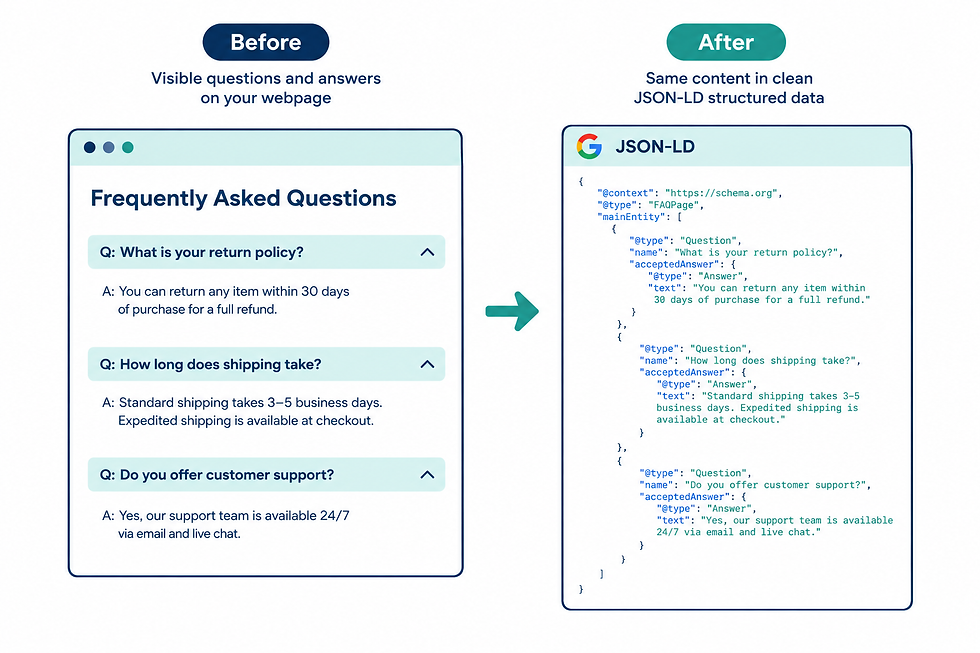
FAQ Page schema is structured data that describes a page containing frequently asked questions and their answers.
JSON-LD is simply a way of putting this information into a format that search engines can read. You normally add it inside a <script> tag in your page's HTML rather than displaying the code to visitors.
A basic example looks like this:
<script type="application/ld+json">
{
  "@context": "https://schema.org",
  "@type": "FAQPage",
  "mainEntity": [
    {
      "@type": "Question",
      "name": "What is FAQ schema?",
      "acceptedAnswer": {
        "@type": "Answer",
        "text": "FAQ schema is structured data that describes questions and answers on a webpage."
      }
    }
  ]
}
</script>
The important parts are easy to understand.
FAQ Page tells search engines what type of page information they are looking at.
Question identifies an individual question.
accepted Answer identifies the answer belonging to that question.
The answer text should match what users can actually see on the page. Google's guidance for structured data stresses that markup should describe visible page content rather than hidden or unrelated information.
Google's own structured data documentation for FAQ pages is worth bookmarking, since it's the definitive source for what's required and what's changed.
Does FAQ schema still matter after Google's FAQ rich result change?
This is where many older SEO articles are now misleading.
Google deprecated the FAQ rich result feature in 2026. That means you should not add FAQ Page schema expecting the old FAQ dropdowns to appear below your organic search result.
So why bother with it?
Structured data can still help describe and classify information on a webpage. More importantly, the process of creating good FAQ markup forces you to keep your questions and answers clear, complete, and consistent with the actual page.
There is also a bigger point about AI search.
Google's current documentation says AI Overviews and AI Mode do not require special schema or another separate markup format. Pages need to meet the normal technical requirements for Google Search, be indexable, and follow Google's existing SEO and content guidance.
So FAQ Page schema should not be treated as an "AI Overview trick." There is no guarantee that adding it will make your content appear in an AI answer.
Instead, think of it as one part of a clean technical setup. Well-written answers, useful page content, crawlability, internal links, strong site structure, and other SEO fundamentals still matter. Structured data works alongside those basics, not instead of them.
The underlying format comes from Schema.org's FAQPage specification, which is the shared vocabulary search engines and AI tools use to understand this kind of content.
How does an FAQ Schema Generator work?
Writing JSON-LD by hand is possible, but it is easy to make small mistakes.
One missing bracket can break the markup. A misplaced quotation mark can make the JSON invalid. It is also easy to accidentally leave an old question in the code after changing the visible FAQ section.
An FAQ Schema Generator solves much of this manual work.
You enter your questions and answers into the tool. The generator then maps that information to the correct Schema.org structure and produces JSON-LD code.
In simple terms, it converts this:
Question: What is FAQ schema?
Answer: FAQ schema is structured data that describes questions and answers on a webpage.
Into something like this:
{
  "@type": "Question",
  "name": "What is FAQ schema?",
  "acceptedAnswer": {
    "@type": "Answer",
    "text": "FAQ schema is structured data that describes questions and answers on a webpage."
  }
}
For several questions, the generator creates multiple Question objects inside the main Entity array.
That is the main job of the tool. It saves you from manually building the JSON structure.
How to generate FAQ Page JSON-LD without writing code
You can create FAQ schema in a few simple steps.
Step 1: Write the actual questions first
Start with the questions people genuinely ask about the page topic.
For example, if you have an article about meta descriptions, useful questions could include:
What is a meta description?
How long should a meta description be?
Does a meta description affect rankings?
Do not create questions simply to add more schema. A small FAQ section with useful answers is better than a long list of weak questions.
Step 2: Write complete answers
Each answer should actually answer its question.
Avoid vague responses such as "Yes, it is important" when the reader needs an explanation.
For example:
A meta description is a short summary of a webpage that can appear below the page title in search results. It helps searchers understand what the page is about before clicking.
That is much more useful than simply saying:
Yes, meta descriptions are important.
Step 3: Enter the content into an FAQ Schema Generator
Open your chosen generator and add each question and answer.
A good generator should take your plain text and produce properly structured FAQ Page JSON-LD. You should not need to understand every line of the generated code.
Still, always review the output before publishing it.
Step 4: Copy the generated JSON-LD
The tool will normally give you a block of code beginning with something similar to:
<script type="application/ld+json">Copy the complete block.
Do not copy only part of the JSON. The opening and closing structure needs to remain intact.
Step 5: Add it to the webpage
The exact process depends on your website platform.
If you use WordPress, your SEO or schema plugin may already provide a place to add structured data. Some websites allow you to add the JSON-LD directly to the page template or HTML.
If you are unsure where to put it, ask your developer or check the documentation for your CMS.
Step 6: Test the markup
Do not assume the code is correct just because it was generated by a tool.
Google recommends validating structured data and checking how Google sees the page. You can use Google's testing tools and Search Console to identify problems.
After publishing, remember that changes are not reflected instantly. Google needs to crawl and process the page.
What should good FAQ schema look like?
A clean setup usually follows a simple relationship:
Visible question → matching schema question
Visible answer → matching schema answer
For example:
Correct setup | Common mistake |
FAQ is visible on the page | FAQ exists only inside the schema |
Schema matches visible wording | Schema contains different answers |
Answers provide useful information | Answers are mainly advertisements |
Each question is relevant | Questions are added only for keywords |
JSON-LD is valid | Broken brackets or invalid JSON |
Content is kept up to date | Old answers remain in the markup |
The key idea is consistency.
If your webpage says one thing while your structured data says something else, you are creating two versions of the same information. That can make the markup less useful and may lead search engines to ignore it.
Common FAQ schema mistakes to avoid

Marking up content that users cannot see
This is one of the easiest mistakes to make.
Someone might create ten FAQ entries in JSON-LD but show only five questions on the page. That creates a mismatch.
Your markup should represent the content users can access.
Adding promotional answers
An FAQ answer should answer the question.
For example, if the question is "What is link building?" an answer that spends most of its space promoting a service is not a good FAQ answer.
Give the reader the information first.
Creating duplicate questions
You do not need three slightly different questions that all have the same answer.
For example:
"How does FAQ schema work?"
"What is FAQ schema used for?"
"What does FAQ schema do?"
If all three answers are basically identical, combining them into one strong question may make more sense.
Forgetting to update the schema
This happens more often than people think.
You update the visible FAQ answer but forget that the old answer is still sitting inside the JSON-LD.
Always check both versions after making major content changes.
Expecting a rich result
This is the biggest outdated expectation.
Google has retired the FAQ rich result feature, so passing a structured data test does not mean Google will display the old FAQ search feature. Google also states more generally that valid structured data does not guarantee that a search feature will appear.
Validation tells you whether the markup is technically valid. It does not promise a particular search appearance.
Can FAQ schema help with Google AI Overview?
There is a lot of confusion around this topic.
FAQ Page schema is not a special ticket into Google AI Overviews. Google explicitly says there is no special schema or markup required to appear in AI Overviews or AI Mode.
Google's AI search systems rely on information from its search index and use existing search and quality systems to find relevant pages. Pages still need to be crawlable, indexable, useful, and eligible to appear in normal Search.
That means the smarter approach is to create genuinely useful FAQ content that answers specific questions clearly.
If an AI system finds your page relevant to a user's question, clear answers can make the information easier to understand. But there is no reliable way to say, "Add FAQ schema and Google will cite you in AI Overview."
Anyone promising that is overselling what schema can do.
How do you check if your FAQ schema is working?
Start with validation.
Check that the JSON-LD has no syntax problems and that the question and answer structure is correct.
Then check the actual webpage. Make sure the FAQ content is visible, readable, and accessible to users. Before publishing, it's worth running the page through Google's Rich Results Test to catch any errors before they show up in Search Console.
After the page is live, use Google Search Console to monitor how Google processes your site. Google recommends using URL Inspection when checking how Google sees a page, and it may take time for crawling and indexing to reflect changes.
Also remember that a valid schema result does not automatically mean Google will show a special search feature.
That distinction saves a lot of unnecessary SEO troubleshooting.
FAQ Schema Generator: Frequently Asked Questions
Is FAQ Page schema still supported by Google?
FAQ Page is a Schema.org type, but Google deprecated its FAQ rich result feature in 2026. You should not expect the former FAQ rich result appearance in Google Search.
Do I need coding knowledge to create FAQ schema?
No. You can use an FAQ Schema Generator to enter normal questions and answers and generate the JSON-LD automatically. You should still review the output and make sure it matches the content on your page.
Does FAQ schema guarantee a Google rich result?
No. Google does not guarantee that structured data will produce a particular search appearance. In the case of FAQ rich results, Google has retired that feature altogether.
Does FAQ schema guarantee AI Overview visibility?
No. Google says there is no special schema required for AI Overviews or AI Mode. Your page still needs strong, helpful content and must meet Google's normal technical and Search requirements.
The simple way to approach FAQ Page schema
FAQ schema is easier to understand when you stop thinking of it as a ranking shortcut.
Your first job is to create useful questions and answers for real readers. Your second job is to make sure the structured data accurately describes that content.
An FAQ Schema Generator simply makes the second part easier by turning your plain questions and answers into machine-readable JSON-LD.
The old FAQ rich result may be gone, but clean structured data can still be part of a well-organized technical SEO setup. Just do not confuse valid markup with a guarantee of visibility.
If you want to generate the code without building the JSON by hand, you can try a free FAQ schema generator and then validate the result before adding it to your page.
The best takeaway is simple: write the FAQ for people, make the schema match it exactly, test the markup, and never treat schema as a shortcut around good SEO.


Comments